OpenC3 COSMOS Architecture
COSMOS Core Architecture
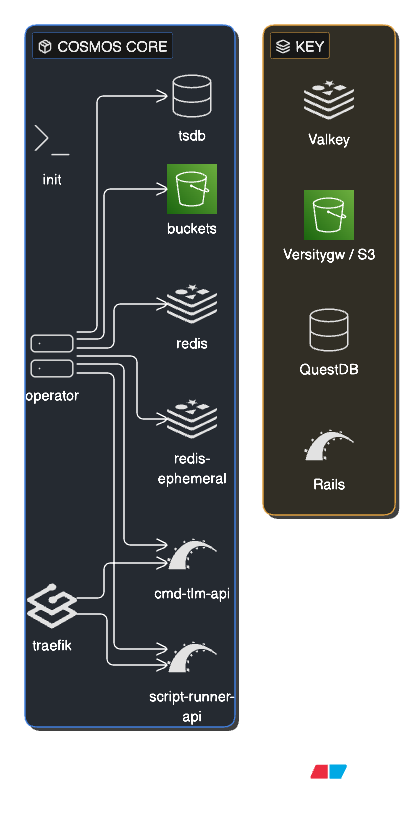
COSMOS Core is a cloud native, containerized, microservice oriented command and control system deployed with Docker Compose. The init container seeds the initial configuration and plugin data into the system on startup. The operator manages the lifecycle of all COSMOS microservices including interfaces that connect to external embedded systems (Targets). Two Rails-based APIs power the system: cmd-tlm-api provides the REST API for command and telemetry operations, while script-runner-api handles script execution. The traefik reverse proxy routes all user browser traffic to the appropriate API. Two Valkey (Redis) data stores are used: redis holds persistent configuration and the current value table, while redis-ephemeral handles real-time data streams. The buckets service provides S3-compatible object storage (powered by Versitygw) for plugins, targets, configuration data, text logs, and binary logs of all raw data. The time-series database (tsdb), powered by QuestDB, stores all decommutated command and telemetry data for fast historical queries.
COSMOS Enterprise Architecture
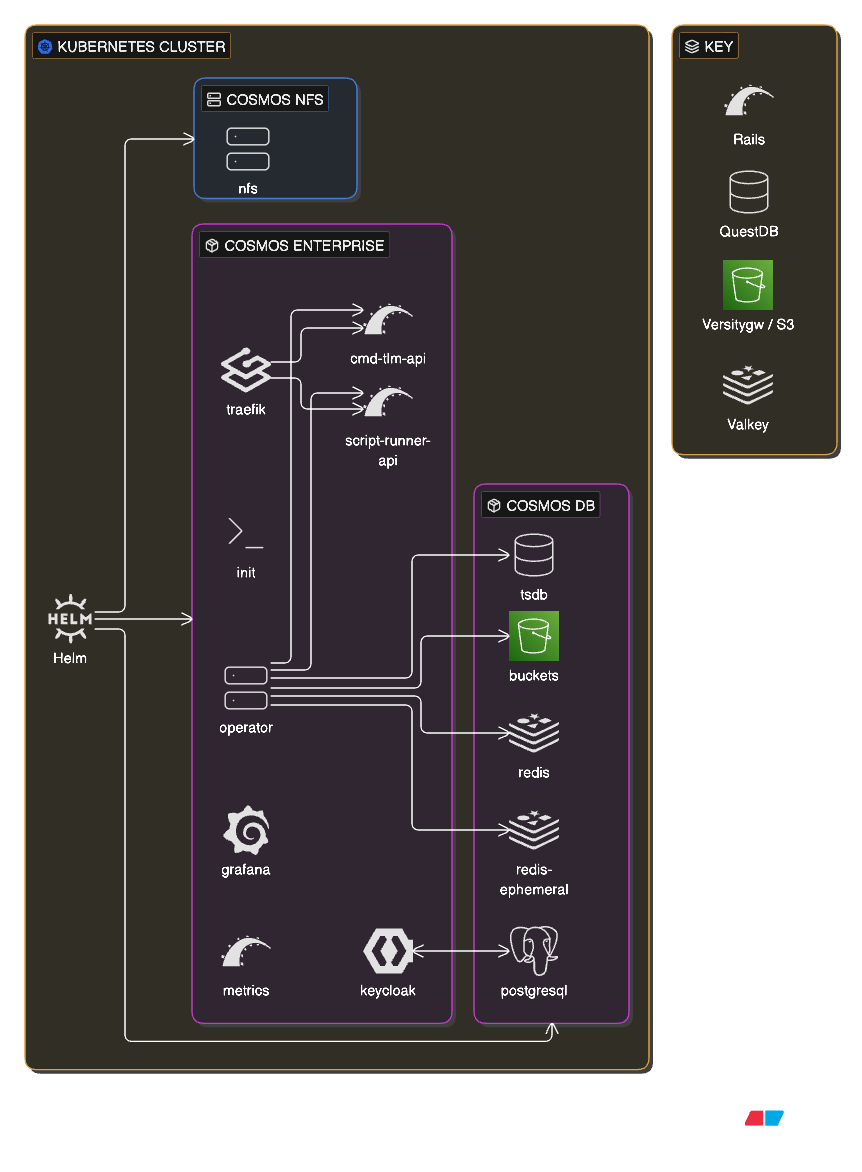
COSMOS Enterprise extends Core with additional services and is optionally deployed on a Kubernetes cluster using Helm charts as shown above. The core services (cmd-tlm-api, script-runner-api, traefik, init, operator) remain the same and are deployed by the openc3 chart. Data services (tsdb, buckets, redis, redis-ephemeral) are deployed by a separate openc3-db chart. Enterprise adds Keycloak for full identity and access management with role-based permissions, backed by a PostgreSQL database. A Grafana instance and metrics collector provide system monitoring and observability dashboards. The COSMOS NFS chart provides shared network file storage across the cluster. All services are orchestrated by Kubernetes, enabling horizontal scaling, high availability, and production-grade deployment.
Terminology
| Term | Definition |
|---|---|
| Target | A COSMOS target is an embedded system that the COSMOS Command and Telemetry Server connects to using an interface in order to send commands to and/or receive telemetry from. |
| Command | A packet of information telling a target to perform an action of some sort. |
| Telemetry | A packet of information providing status from a target. |
| Interface | A physical connection to a target that sends commands to and/or receives telemetry from a target. COSMOS comes with interfaces that support TCP/IP, UDP, and serial connections. Custom interfaces are easy to add to the system. |
| Configuration Files | COSMOS uses simple plain text configuration files to define commands and telemetry packets, and to configure each COSMOS application. These files are easily human readable/editable and machine readable/editable. |
| Tool | Another name for a COSMOS application. |
Key aspects of this architecture:
- COSMOS can connect to many different kinds of targets. The examples include things like Flight software (FSW), Ground Support Equipment (GSE), Labview, and COTS targets such as an Agilent power supply. Any embedded system that provides a communication interface can be connected to COSMOS. The flexibility of interfaces, protocols, and accessors mean we adapt to your hardware, not the other way around!
- All realtime communication with targets flows through the COSMOS system. This ensures all commands and telemetry are logged.
- Every tool is configured with plain text configuration files.
- Program specific tools can be written using the COSMOS libraries that can interact with the realtime command and telemetry streams and can process logged data.
Projects
The main COSMOS repo contains all the source code used to build and run COSMOS. However, users (not developers) of COSMOS should use the COSMOS project to launch COSMOS. The project consists of the openc3.sh and openc3.bat files for starting and stopping COSMOS, the compose.yaml for configuring the COSMOS containers, and the .env file for setting runtime variables. Additionally, the COSMOS project contains user modifiable config files for both Redis and Traefik.
Containerization
Images
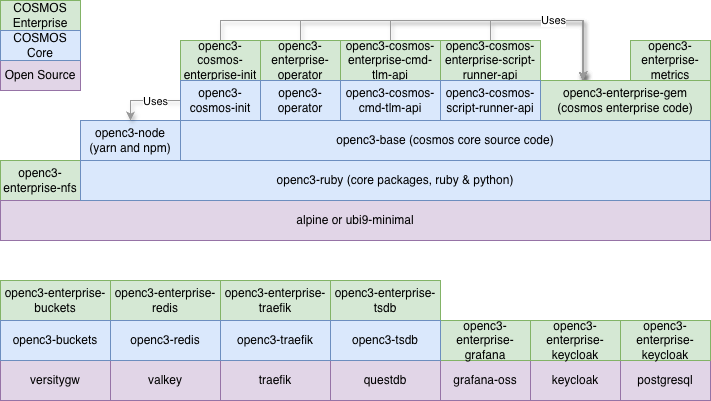
Per Docker, "An image is a read-only template with instructions for creating a Docker container." The base operating system COSMOS uses is called Alpine Linux. It is a simple and compact image with a full package system that allows us to install our dependencies. Starting with Alpine, we create a Dockerfile to add Ruby and Python and a few other packages to create our own docker image. We further build upon that image to create a NodeJS image to support our frontend and additional images to support our backend.
The following diagram shows all the COSMOS Core and Enterprise container images. Images are built from the bottom up in the Dockerfile using FROM. Images referenced with "Uses" are used during the build stage.
Containers
Per Docker, "a container is a standard unit of software that packages up code and all its dependencies so the application runs quickly and reliably from one computing environment to another." Also per Docker, "A container is an isolated environment for your code. This means that a container has no knowledge of your operating system, or your files. It runs on the environment provided to you by Docker Desktop. Containers have everything that your code needs in order to run, down to a base operating system." COSMOS utilizes containers to provide a consistent runtime environment. Containers make it easy to deploy to local on-prem servers, cloud environments, or air-gapped networks.
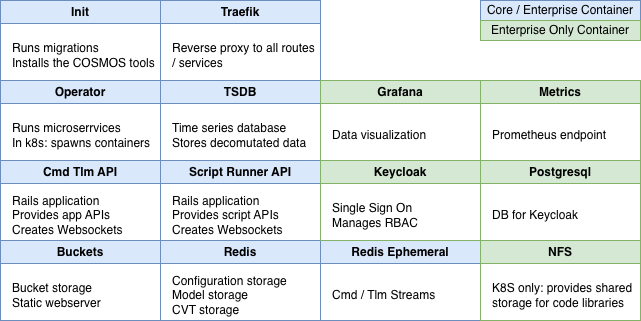
The COSMOS Core containers consist of the following:
| Name | Description |
|---|---|
| cosmos-openc3-cosmos-init-1 | Run migrations, installs the COSMOS tools, and then exits |
| cosmos-openc3-operator-1 | Main COSMOS container that runs the interfaces and target microservices |
| cosmos-openc3-traefik-1 | Provides a reverse proxy and load balancer with routes to the COSMOS endpoints |
| cosmos-openc3-cosmos-cmd-tlm-api-1 | Rails server that provides all the COSMOS API endpoints |
| cosmos-openc3-cosmos-script-runner-api-1 | Rails server that provides the Script API endpoints |
| cosmos-openc3-buckets-1 | Provides a S3 like bucket storage interface and also serves as a static webserver for the tool files |
| cosmos-openc3-redis-1 | Serves the static target configuration and Current Value Table |
| cosmos-openc3-redis-ephemeral-1 | Serves the streams containing the raw and decomutated data |
| cosmos-openc3-tsdb-1 | QuestDB time-series database for long-term storage of decommutated data |
The container list for COSMOS Enterprise consists of the following:
| Name | Description |
|---|---|
| cosmos-enterprise-openc3-grafana-1 | Grafana container preconfigured with the COSMOS Data Source |
| cosmos-enterprise-openc3-metrics-1 | Rails server that provides metrics on COSMOS performance |
| cosmos-enterprise-openc3-keycloak-1 | Single-Sign On service for authentication |
| cosmos-enterprise-openc3-postgresql-1 | SQL Database for use by Keycloak |
| openc3-nfs * | Network File System pod only for use in Kubernetes to share code libraries between containers |
A diagram of the running containers is shown below:
Docker Compose
Per Docker, "Compose is a tool for defining and running multi-container Docker applications. With Compose, you use a YAML file to configure your application's services. Then, with a single command, you create and start all the services from your configuration." OpenC3 uses compose files to both build and run COSMOS. The compose.yaml is where ports are exposed and environment variables are used.
Environment File
COSMOS uses an environment file along with Docker Compose to pass environment variables into the COSMOS runtime. This .env file consists of simple key value pairs that contain the version of COSMOS deployed, usernames and passwords, and much more.
Kubernetes
Per Kubernetes.io, "Kubernetes, also known as K8s, is an open-source system for automating deployment, scaling, and management of containerized applications. It groups containers that make up an application into logical units for easy management and discovery." COSMOS Enterprise provides Helm charts for easy deployment to Kubernetes in various cloud environments.
COSMOS Enterprise also provides configuration to deploy COSMOS infrastructure on various cloud environments (e.g. CloudFormation template on AWS).
Frontend
Vue.js
The COSMOS frontend is fully browser native and is implemented in the Vue.js framework. Per Vue.js, "Vue is a JavaScript framework for building user interfaces. It builds on top of standard HTML, CSS, and JavaScript and provides a declarative and component-based programming model that helps you efficiently develop user interfaces, be they simple or complex." COSMOS utilizes Vue.js and the Vuetify Component Framework UI library to build all the COSMOS tools which run in the browser of your choice. COSMOS 5 utilized Vue.js 2.x and Vuetify 2.x while COSMOS 6 utilizes Vue.js 3.x and Vuetify 3.x.
Single-Spa
While COSMOS itself is written in Vue.js, we utilize a technology called single-spa to allow COSMOS developers to create applications in any javascript framework they choose. Single-spa is a micro frontend framework and acts as a top level router to render the application being requested. COSMOS provides sample applications ready to plug into single-spa in Angular, React, Svelte, and Vue.
Astro UX
Per AstroUXDS, "The Astro Space UX Design System enables developers and designers to build rich space app experiences with established interaction patterns and best practices." COSMOS utilizes the Astro design guidelines for color, typograpy, and iconograpy. In some cases, e.g. Astro Clock, COSMOS directly incorporates Astro components.
Backend
Valkey
Valkey is an in-memory data store with support for strings, hashes, lists, sets, sorted sets, streams, and more. COSMOS uses Valkey to store both our configuration and data. If you look back at our container list you'll notice two valkey containers: cosmos-openc3-redis-1 and cosmos-openc3-redis-ephemeral-1 (still named Redis after the original). The ephemeral container contains all the real-time data pushed into streams. The other container contains COSMOS configuration that is meant to persist. COSMOS Enterprise provides helm charts that setup Valkey to perform horizontal scaling where data is shared across multiple nodes.
Versitygw
Versitygw is a high-performance, S3 compatible object store. COSMOS uses this storage technology to host both the COSMOS tools themselves and the long term log files. COSMOS Enterprise deployed in a cloud environment uses the available cloud native bucket storage technology, e.g. AWS S3, GCP Buckets, and Azure Blob Storage. Using bucket storage allows COSMOS to directly serve the tools as a static website and thus we don't need to deploy Tomcat or Nginx for example.
Ruby on Rails
The COSMOS API and Script Runner backends are powered by Ruby on Rails. Rails is a web application development framework written in the Ruby programming language. Rails (and our familiarity with Ruby) allows us to write less code while accomplishing more than many other languages and frameworks.
QuestDB
COSMOS uses QuestDB as its time-series database (TSDB) for long-term telemetry storage. This includes storage of all the COSMOS telemetry types: RAW, CONVERTED, and FORMATTED. COSMOS still stores the raw packet data as binary files in the object storage (versitygw or cloud native). The storage of raw binary files can be controlled by the CMD_LOG_RETAIN_TIME and TLM_LOG_RETAIN_TIME. QuestDB is a high-performance database optimized for time-series data, offering fast ingestion rates and efficient querying of large datasets. Data is ingested into QuestDB via the ILP HTTP protocol.
While Valkey stores real-time streaming data and the current value table, QuestDB provides persistent storage for historical telemetry. This enables users to query telemetry data over extended time periods using standard SQL syntax. Each telemetry and command packet gets its own QuestDB table using the naming convention SCOPE__TLM__TARGET__PACKET or SCOPE__CMD__TARGET__PACKET. Note that all COSMOS tools using the Streaming API including Command History, Data Extractor, Data Viewer, Telemetry Grapher, Grafana all now use QuestDB to pull engineering data.
Data Type Mapping
COSMOS maps its data types to QuestDB column types as follows:
| COSMOS Type | Bit Size | QuestDB Type | Notes |
|---|---|---|---|
| INT | < 32 | int | Small signed integers and bitfields |
| INT | 32 | long | Promoted to long (QuestDB uses int MIN as NULL) |
| INT | 64 | DECIMAL(20, 0) | Full 64-bit signed range |
| UINT | < 32 | int | Fits in signed int |
| UINT | 32 | long | Needs 33 bits for full unsigned range |
| UINT | 64 | DECIMAL(20, 0) | Full 64-bit unsigned range |
| FLOAT | 32 | float | IEEE 754 single precision |
| FLOAT | 64 | double | IEEE 754 double precision |
| STRING | var | varchar | Variable-length text |
| BLOCK | var | varchar | Base64-encoded binary |
| ARRAY | var | varchar | JSON-serialized arrays |
| DERIVED | var | varies | Based on converted_type/bit_size; defaults to varchar |
Special Float Value Handling
QuestDB does not support IEEE 754 special values directly. The following sentinel values are used:
| Special Value | 64-bit (double) Sentinel | 32-bit (float) Sentinel |
|---|---|---|
Infinity | 1.7976931348623155e+308 (near DBL_MAX) | 3.4028233e+38 (near FLT_MAX) |
-Infinity | -1.7976931348623155e+308 (near -DBL_MAX) | -3.4028233e+38 (near -FLT_MAX) |
NaN | -1.7976931348623153e+308 (negative, near -DBL_MAX) | -3.4028231e+38 (negative, near -FLT_MAX) |
These sentinels allow special float values to be stored and retrieved without data loss.
Other Limitations
- Integer
MIN_VALUEis used as NULL sentinel in QuestDB - Arrays are always stored as JSON-serialized strings for consistency
- 64-bit integer values are sent as strings via ILP; QuestDB casts them to DECIMAL
Packet Structure Changes
QuestDB table schemas are reconciled against the current packet definitions each time the tsdb microservice starts (plugin install or COSMOS restart). New items become new columns, changed item types become ALTER COLUMN ... TYPE statements, and removed items leave their existing column in place. Some type changes silently NULL existing values. See Packet Structure Changes for the full behavior and the recommended workflow.
Historical Data Migration
COSMOS provides a migration plugin for ingesting historical decommutated telemetry and command data from binary log files into QuestDB. The plugin reads COSMOS binary packet log files (.bin and .bin.gz) from S3-compatible storage and batch-ingests the data into QuestDB. It processes files in reverse chronological order (newest first) and rate-limits ingestion to avoid overwhelming operational systems.
QuestDB tables are partitioned by day, so individual partitions can be detached for long-term archival and reattached later. See Removing and Restoring Partitions in the Backups guide for the workflow.
Keycloak (Enterprise)
COSMOS Enterprise uses Keycloak as its Single Sign-On (SSO) solution. Keycloak is an open-source Identity and Access Management system that provides authentication, authorization, and user federation capabilities. Keycloak implements the OAuth 2.0 and OpenID Connect protocols and issues several types of tokens to manage user sessions.
Access Token
The access token is a short-lived JSON Web Token (JWT) used to authenticate API requests. It is included in the Authorization: Bearer <token> header of HTTP requests and contains user identity and permissions (claims). When an access token expires, the client must obtain a new one using a refresh token. COSMOS Enterprise default: 5 minutes.
Refresh Token
The refresh token is a longer-lived token used solely to obtain new access tokens. It is never sent to resource servers—only to Keycloak's token endpoint. Each refresh request typically returns a new refresh token (token rotation). The refresh token expires after a period of inactivity (SSO Session Idle) or after a maximum lifespan (SSO Session Max), at which point the user must re-authenticate. COSMOS Enterprise defaults: 30 minutes idle timeout, 10 hours max lifespan.
Offline Access Token
The offline access token is a special type of refresh token designed for long-lived sessions lasting days, weeks, or indefinitely. It is obtained by requesting the offline_access scope during authentication. Unlike regular refresh tokens, offline access tokens survive Keycloak server restarts and user session logouts. They are useful for automated scripts or services that need persistent access without user interaction. Offline tokens have separate configuration settings: "Offline Session Idle" and "Offline Session Max". COSMOS Enterprise defaults: 30 days idle timeout, max lifespan not enforced (tokens can last indefinitely if used regularly).
Token Lifecycle
The typical token lifecycle works as follows:
- User authenticates with Keycloak and receives an access token and refresh token
- Client uses the access token for API calls
- Access token expires and client sends the refresh token to Keycloak
- Keycloak issues a new access token and new refresh token
- Steps 2-4 repeat until the refresh token expires or the user logs out
For examples of using these tokens with curl see Testing with Curl.
Automatic Token Refresh
COSMOS Enterprise automatically refreshes tokens to maintain user sessions. Every 60 seconds, the application checks if the access token will expire within the next 2 minutes. If so, it sends the current refresh token to Keycloak's token endpoint and receives both a new access token and a new refresh token.
With the default 5-minute access token lifespan, this results in token refreshes approximately every 3-4 minutes. Each refresh resets the refresh token's idle timeout, keeping the session alive as long as the user has the application open.
Important notes on idle timeout behavior:
- The refresh token idle timeout is only reset when the application communicates with Keycloak (i.e., during token refresh)
- Making API calls using the access token does not reset the refresh token idle timeout, because those requests never reach Keycloak
- If a user closes the browser for longer than the idle timeout (default 30 minutes), they must re-authenticate
Default Token Lifespans
| Token Type | Setting | Default Value |
|---|---|---|
| Access Token | Lifespan | 5 minutes |
| Refresh Token | Idle Timeout | 30 minutes |
| Refresh Token | Max Lifespan | 10 hours |
| Offline Token | Idle Timeout | 30 days |
| Offline Token | Max Lifespan | Not enforced |